Startup grace
Gives large transfers time to reach normal throughput before slow-speed checks begin.
 putiorr
Configuration guide
Configure one RR profile per app, attach the right download profile, then paste the generated Transmission values into Radarr, Sonarr, and Lidarr. Browser grabs get a profile of their own.
Each RR profile maps one app to a put.io destination folder, a shared local download target, and a Transmission RPC endpoint path. The app's download-client category creates the final import subfolder under that target.
A download belongs to exactly one profile, and the owner is decided
once — when the download is created — and never re-derived. For an
*arr app that is the profile the request named: the RPC path it
arrived on, or the app's own User-Agent. For a browser
grab it is the profile the caller picked, else the one claiming the
page's site, else the one set to take the sites nobody claims. The
category selects nothing: it names the staging subfolder and never
picks or vetoes a profile.
Every *arr can share the /transmission/rpc endpoint
with no URL Base change. Sonarr, Radarr, Lidarr, Readarr and
Prowlarr each put their own name in the
User-Agent — Sonarr/4.0.19.2932 (linux x64)
— and putiorr matches the part before the slash against each
profile's slug, name and app preset. The header routes the request
and nothing else; it never moves an existing download between
profiles.
A distinct RPC path is the override for what the name cannot
settle: two Sonarr instances, or a client that does not name
itself. That path always wins over the header. A request neither
resolves is refused for torrent-add and
torrent-remove, naming the RPC path each profile
should use instead — including the profile still sitting on the
shared path, which needs one of its own.
session-get and torrent-get always
answer: the first is the call an *arr uses to test the connection,
the second is the queue poll that drives completed-download
import, and an unresolved one lists every download rather than
failing.
One put.io transfer belongs to one download, keyed on put.io's own transfer id. put.io de-duplicates, so a second profile grabbing a release the first already owns gets that same transfer back, and putiorr refuses the second add by name rather than letting two profiles share one download.
| App | put.io folder | Download folder | RPC endpoint | Category |
|---|---|---|---|---|
| Radarr | putiorr |
/downloads |
/radarr/transmission/rpc |
radarr |
| Sonarr | putiorr |
/downloads |
/sonarr/transmission/rpc |
sonarr |
| Lidarr | putiorr |
/downloads |
/lidarr/transmission/rpc |
lidarr |
| Readarr | putiorr |
/downloads |
/readarr/transmission/rpc |
readarr |
Example: Sonarr category sonarr plus download folder
/downloads means completed files appear under
/downloads/sonarr for Sonarr's importer. The same
host folder must be mounted into putiorr and Sonarr at
/downloads, for example
/volume/downloads:/downloads in both containers, so
Sonarr does not need custom Remote Path Mapping.
<download folder>/<category>/<the name put.io gave the transfer>
The name is put.io's, untouched, because every *arr resolves a
completed download as downloadDir + name: a folder
spelled any other way is a download that never imports. That folder
is frozen the first time the download is staged, so a later rename
on put.io does not move it — the name putiorr reports follows the
rename, because that is what you see in the dashboard, but the
files on disk do not.
A disabled profile accepts no new work. It is a
refusal, never a disappearance: it still holds its RPC path, still
answers to its own name on the shared endpoint, still claims its
browser sites and the catch-all if it holds that, and is still
counted when the shared endpoint decides whether it is ambiguous.
Only the doors that create work ask — torrent-add,
/api/grab, and the adoption of a put.io transfer
putiorr did not create. The first two refuse with one sentence
naming the profile, because somebody is waiting on the answer;
adoption is nobody's request, so the transfer is left on put.io
without a word and is adopted on the next poll once the profile is
switched back on. The downloads already queued keep downloading and
stay listable, importable, and removable.
A download cannot be left without an owner, so a profile that still owns downloads is not deleted until you say what happens to them. The dialog states the counts first — how many downloads, how many of them already removed from the list but still on put.io, and how many files and bytes are in their staging folders — then takes one of three answers: move them to another RR profile, remove them from putiorr (optionally cancelling their put.io transfers and deleting their files), or neither, which is refused.
The move target is restricted to profiles that download into the same folder. Nothing moves on disk, so a profile that stages elsewhere would be pointed at an empty directory — and a finished download whose files have gone missing is deleted and its put.io transfer cancelled.
Download profiles tune local-copy behavior by use case. Use one profile per download shape when movies, episodes, music, or books need different reset rules.
Gives large transfers time to reach normal throughput before slow-speed checks begin.
Excludes tiny files from slow-speed reset rules so metadata does not distort behavior.
Restarts a local file download after it stays below the configured speed for the configured duration.
Add a Transmission download client in each app. When the app container shares a Docker network with putiorr, the host is the compose service name and the port is putiorr's internal RPC port.
| Field | Radarr | Sonarr | Lidarr |
|---|---|---|---|
| Name | putiorr |
putiorr |
putiorr |
| Host | putiorr |
putiorr |
putiorr |
| Port | 9091 |
9091 |
9091 |
| Use SSL | Off | Off | Off |
| Category | radarr |
sonarr |
lidarr |
| Directory | /downloads |
/downloads |
/downloads |
| URL Base | /radarr/transmission |
/sonarr/transmission |
/lidarr/transmission |
Leave username and password blank unless you configured
PUTIORR_RPC_USERNAME and PUTIORR_RPC_PASSWORD.
Keep completed-download handling enabled in the *arr app.
Prowlarr usually does not need its own putiorr profile. It connects to Radarr, Sonarr, and Lidarr, syncs indexers, and those apps send accepted grabs to putiorr through their Transmission client settings.
Radarr URL: http://radarr:7878
Sonarr URL: http://sonarr:8989
Lidarr URL: http://lidarr:8686A Sonarr or Radarr profile can check what put.io actually produced before putiorr downloads any of it. A release the app could never import is blacklisted, searched again, and removed from put.io — rather than downloaded, failed at import, and left blocking that episode or movie in Activity.
This needs the app's URL and API key. Blacklisting a release — Sonarr and Radarr call it the blocklist — exists only in their REST API: a download client speaking Transmission has no way to ask for it, which is why putiorr sets a torrent error today and the item still sits in the queue.
Open the profile wizard on a Sonarr or Radarr profile and fill in the Reject bad releases step.
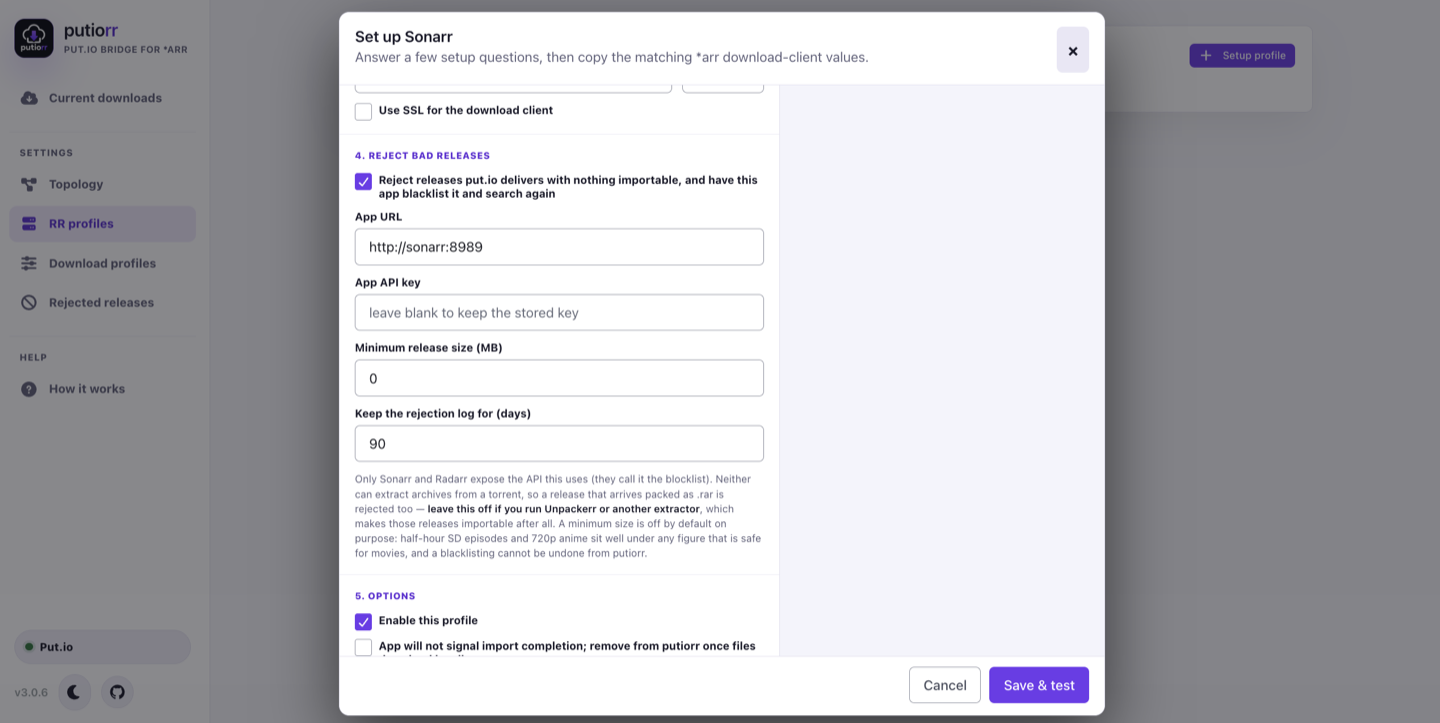
| Field | What it does |
|---|---|
| Reject releases… | The switch for the whole feature. Off by default, and off after upgrading. |
| App URL | Where the app answers, for example http://sonarr:8989 or http://radarr:7878. |
| App API key | From the app's Settings → General. Stored write-only: putiorr never sends it back to the browser, and leaving the field blank keeps the stored one. |
| Minimum release size | Optional floor in MB. 0 disables it. |
| Keep the rejection log for | Days to keep this profile's rejections. 0 keeps them forever. |
.rar set is exactly the "no files found are eligible for import" case.
Disc structures — VIDEO_TS, BDMV — and .iso
files still pass, and so does anything sitting next to a playable file.
A figure that is safe for movies is not safe for television. A half-hour SD episode is 150–250 MB and 720p anime runs 200–350 MB, so a shipped default would quietly blacklist entire libraries. Set it per profile if you want it, and set it low on Sonarr.
putiorr asks the app to search for a replacement itself rather than relying on the app to do it. Sonarr only re-searches after a failure when its own Redownload Failed setting is on, so leaving that decision to the app meant releases were blacklisted and then never replaced, with nothing saying why. However that setting is configured, exactly one search runs.
Every rejection is recorded on the dashboard's Rejected releases screen: what was thrown away, why, on which profile, and when. It is paged, searchable, and filterable by outcome, and unread rejections raise a badge in the sidebar until Read all clears them. A blacklisting is invisible and permanent, so this is the only place a wrong one can be found after the fact.
Releases putiorr judged unimportable but could not report to the app — it was unreachable, or its queue never held the release — are listed separately as Not blacklisted. Those were downloaded as usual, and their queue item may still need attention.
Lidarr and Readarr are not offered this step. They serve a different API version that putiorr does not implement.
The putiorr browser extension, in the extension/
folder of the
putiorr repository,
captures the magnet: links and .torrent
downloads you click in Chrome and sends them to putiorr, which
queues them on put.io and copies the finished files to the local
download folder. No *arr app is involved, so these grabs get their
own kind of profile.
In the putiorr dashboard, add a profile and set App preset to Putiorr Grab. The wizard then hides the RPC endpoint step, because nothing connects to a grab profile over Transmission RPC, and shows a Browser grabs step instead.
| Field | What to enter |
|---|---|
| Display name | The name the extension shows in its profile list and right-click menu, such as movies. |
| Put.io destination folder | putiorr, or a separate folder to keep browser grabs apart on put.io. |
| Shared download folder | Where the files land, such as /downloads. Grabs are written straight into it; no category subfolder is created. |
| Download profile | The local-copy behavior to apply, exactly as for an *arr profile. |
| Browser sites | Comma-separated sites whose grabs land here, such as x.example, z.example. A plain entry matches that host and nothing under it; put *. in front — *.x.example — to match it and every subdomain of it, at any depth. The star is only ever the first thing in an entry. |
| Take grabs from any site no other profile claims | Ticked on one grab profile, every grab from a site nobody listed lands there. A fallback, not a wildcard: a profile that lists a site still wins for it. At most one profile may hold it, and a second save is refused, naming the one that does — with an offer to hand the role over, which saves what you typed and unticks the box on that profile in the same step. |
putiorr resolves every grab itself, and nothing in the extension
takes part in that decision. It answers in a fixed order: the
profile picked by hand from the right-click menu, then the profile
claiming the page's host exactly, then the
profile with the most specific wildcard covering it — the longest
base wins, so *.dl.x.example beats
*.x.example — then the profile that takes the
unclaimed sites, and otherwise a refusal. Matching compares the
hostname alone; scheme, port, and path are stripped first. A grab
aimed at a profile that is not a Putiorr Grab profile is refused by
name. A grab profile has no Transmission RPC endpoint at all —
nothing connects to one as a download client — so
/api/grab is the only way in, and it requires the
X-Putiorr-Grab header.
Two profiles may not hold the same entry, and that save is
refused naming the one that already has it. Coverage that merely
overlaps is intended: dl.x.example on one profile and
*.x.example on another sends that one host to the
first and the rest of the domain to the second, which is what the
order above is for.
The extension's toolbar icon opens a popup about the page in the
current tab. It names that page's site and says which profile a
grab from it would land in — the profile that claims it, the
profile that takes the sites nobody claims, or nobody at all — and,
when no profile claims it, offers to claim it for one of them. The
site it stores sits in an editable field, pre-filled with the
page's hostname exactly as it is, www. and all, and
the popup says to start it with *. to take the
subdomains too. Nothing here shortens a host to the registrable
domain behind it: neither putiorr nor the extension carries a
public-suffix list, and the rule that would turn
www.x.example into x.example would also
turn x.co.uk into co.uk.
A site another profile already claims is not offered a second time:
the popup names that profile and stops. Moving a site is two
profiles changing at once, from a popup that shows one of them,
which belongs on the profiles themselves. The popup writes through
POST /api/profiles/<id>/browser-sites, which
appends one site to one Putiorr Grab profile, normalizes it exactly
as Browser sites does, answers with that profile's
resulting list, and refuses with 409 — naming the
profile — when another one already claims the site. It requires the
same X-Putiorr-Grab header /api/grab does.
Switching a grab profile off does not release its sites, or the catch-all if it holds it. It still claims them, and such a grab is refused by name rather than falling through to the next profile, which would put the transfer in a folder nobody chose.
The extension goes on the machine running Chrome — putiorr is on the NAS, the browser is not:
putiorr-grab-<version>.zip from the Assets of the newest release, unpack it somewhere permanent, then enable Developer mode on chrome://extensions and choose Load unpacked on the folder holding manifest.json.http://nas:9091, plus the Basic auth credentials if putiorr uses them.The browser extension guide covers each of those in full: both install routes, why an unpacked extension's folder path is its identity, and how updating differs between a store install and an unpacked one.
The extension only ever lists Putiorr Grab profiles, so create at
least one before loading profiles there. The preset also enables
auto-remove completed — in the wizard, through
POST /api/profiles, and in
PUTIORR_PROFILES_JSON alike: nothing imports a browser
grab, so putiorr drops the finished transfer from its list and from
put.io once the files are on disk. Send
auto_remove_completed: false to opt out.
putiorr reports progress in two phases. The dashboard is the best view for file-level local progress and per-file speed.
0-50%:   put.io remote transfer
50-100%: local download from put.io to the download target
Local downloads are written as .part files and resume
with HTTP range requests after restarts. Optional slow-speed reset
closes and resumes a local download if it stays below the selected
threshold after the startup grace window.